

Updated: June 9, 2023.
Is my site penalized by Google? Let’s find out.
Let’s talk to you about a subject that’s critical to any website owner – Google penalties.
In the simplest terms, a Google penalty is a negative impact on a website’s search rankings based on either Google’s manual review or algorithmic updates.
Why should you care about Google penalties? Well, if you’ve ever experienced a sudden drop in your website traffic or a slide in your rankings, there’s a chance you might be dealing with a Google penalty.
And believe me, when it comes to your website’s visibility and traffic, this is a matter you should take seriously.
I’m here to help you understand if your site has been penalized and what you can do about it.
So, let’s dive in, shall we?
Is my site penalized by Google? TL;DR
- Google penalties can be manual (from Google’s team due to quality guideline breaches) or algorithmic (automatic demotions due to ranking algorithm updates).
- Check for manual penalties in Google Search Console.
- For algorithmic penalties, compare the timing of your traffic drop with known Google algorithm updates.
- If Bing traffic mirrors Google’s drop, it might not be a penalty but a website issue.
- Always investigate thoroughly to pinpoint the cause.
What you should know about Google penalties
A Google penalty is essentially a “punishment” Google dishes out when it decides a website is breaking its rules. This could be due to various reasons like spammy backlinks or overloading your website with keywords.
As a result, the website may lose its ranking in the Google search results, which means less visibility, less traffic, and ultimately, less business.
Manual actions vs algorithmic penalties
So, now that we know what a Google penalty is, let’s look at the two main types:
Manual Penalties
As the name suggests, these penalties are manually applied by a human reviewer at Google. This happens when your site is reviewed, and they find that it’s not complying with Google’s quality guidelines.
For example, let’s say you’ve built tons of unnatural links to boost your rankings. A Google reviewer checks your site, sees this, and bam – you’re hit with a manual penalty. When this happens, you’ll receive a message in your Google Search Console explaining what’s wrong.
Algorithmic Penalties
These are a bit more tricky. Algorithmic penalties are automatic and happen when Google’s complex algorithms (like the old and famous Panda or Penguin) detect that your site is bending or breaking the rules.
For instance, if your site has lots of low-quality content (think: ‘thin’ pages with little valuable information), the algorithm might just penalize your site, leading to a sudden drop in rankings.
The tricky part? Google doesn’t send you a note when this happens.
Is your site penalized by Google? Signs
Now let’s focus on the signs that your site might have been hit with one. Here are three major indicators that you should keep an eye out for.
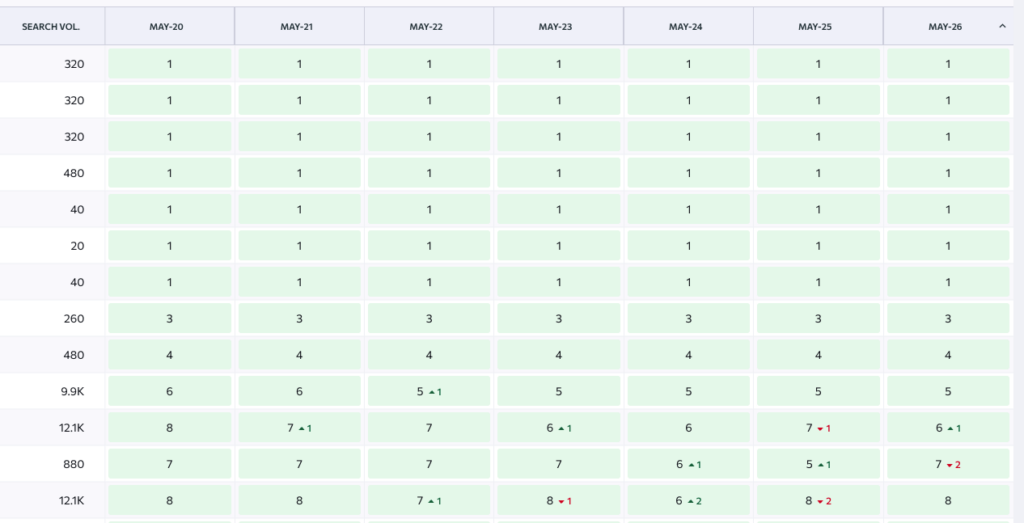
Sudden Drop in Organic Search Rankings
This is one of the most obvious and immediate signs of a Google penalty.
Let’s say your website has been ranking consistently well for your top keywords, but suddenly you notice it’s not even on the first page of the search results. That could be a sign of a penalty.
For instance, if you’ve always been in the top three for “best SEO consultant,” but you’ve suddenly dropped to page two or three, it’s time to do some digging.
TIP: A good way to keep an eye on rankings is to use a rank tracker like SE Ranking Rack Tracker.
Significant Decrease in Organic Search Traffic
Organic search traffic refers to the visitors who land on your website as a result of unpaid (“organic”) search results.
If you notice a significant, unexplained decrease in your organic search traffic, it might be due to a penalty.
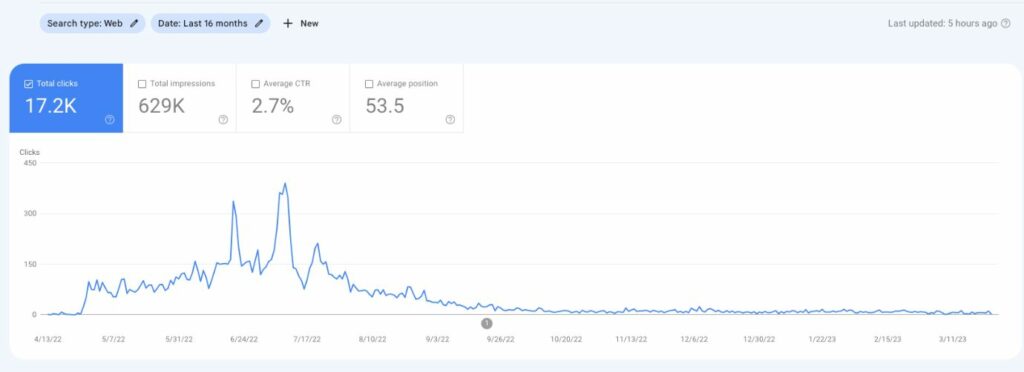
For example, let’s say you usually get 1,000 organic visits per day, but over the past few days, it’s dropped to 600 without any apparent reason. This could be a signal that Google’s algorithms or a manual reviewer have taken issue with something on your site.
TIP: The best way to check organic traffic is to use Google Search Console which only shows organic traffic as opposed to Google Analytics which shows traffic from multiple sources.
Receiving a Penalty Notification in Google Search Console
Google is pretty good about letting you know when they’ve manually penalized your site. They’ll send you a message directly in your Google Search Console account.
This message will tell you that they’ve applied a manual action against your site, along with a general explanation of what the issue is.
Check this article: 15 Ways To Check Why Your Site’s Traffic May Be Down
How to check if a site has a manual penalty
Alright, you’ve spotted the signs and you’re ready to investigate. The first stop? Google Search Console.
Using Google Search Console to Check for Penalties
If you’re not familiar with Google Search Console (GSC), it’s a tool that helps you understand and improve how Google sees your website. It’s great both for monitoring organic traffic and technical well-being of your site.
Think of it as your command center for monitoring your site’s presence in Google’s search results, and troubleshooting any issues that come up.
How to use Google Search Console to check for manual actions
Here’s a step-by-step guide on how you can use GSC to check if your site has been hit with a manual penalty:
- Log Into Google Search Console: The first step is to log into your Google Search Console account. If you don’t have one yet, you’ll need to set one up and verify your website. It’s a simple process, and it’s free.
- Go to the ‘Security & Manual Actions’ Section: Once you’re logged in, look at the left-hand side menu and find the ‘Security & Manual Actions’ dropdown.
- Select ‘Manual Actions’: Click on this option and you’ll be taken to a page which lists any manual actions that have been applied to your site. If your site has a manual action, you’ll see a report that includes the issue and a button to ‘Learn More’, which will provide you with additional details and steps on how to resolve the problem.
If your site does not have a manual action, then in Google Search Console (under Security & Manual Actions > Manual actions), you will see “No issues detected” information.
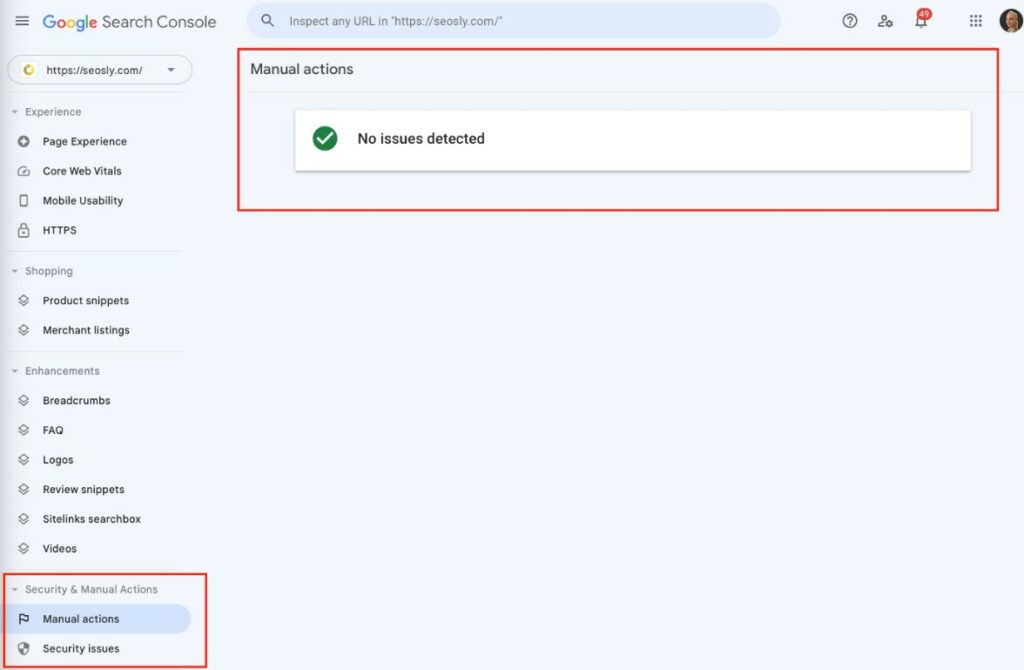
But remember, no manual actions doesn’t mean no penalties at all. Algorithmic penalties might still be lurking.
Keep in mind that Google Search Console is a very powerful tool beyond just checking for penalties. It provides you with loads of data about your site’s performance, issues, and ways to optimize for better search visibility. So, it’s a good idea to get friendly with it!
Check my guides for Google Search Console:
Understanding the Penalty Messages in Google Search Console
Let’s now dive into those penalty messages you may find in Google Search Console (GSC). These messages can be a little intimidating, but understanding them is key to fixing any issues and getting your site back in Google’s good graces.
Common types of penalty messages include:
- Unnatural Links to Your Site: This message means that Google has detected a pattern of unnatural, artificial, deceptive, or manipulative outbound links on your site. Basically, it’s saying that your link-building strategies don’t align with Google’s quality guidelines.
- Unnatural Links from Your Site: If you see this, it means Google has found suspicious outbound links from your site. This could happen if you’ve been selling links or if your website has been hacked.
- User-Generated Spam: This penalty happens when spammy content is detected on your site, often in the comments section or user profiles.
- Pure Spam: This is serious. Google issues this penalty when it detects aggressive spam tactics like auto-generated content, cloaking, or scraped content on your site.
- Thin Content with Little or No Added Value: This penalty means that Google found a lot of content on your site that doesn’t provide much value to users. This could be auto-generated content, doorway pages, or even duplicate content across different pages.
These are only the most common manual penalties. You will find detailed explanations of each type of manual penalty in the Google documentation.
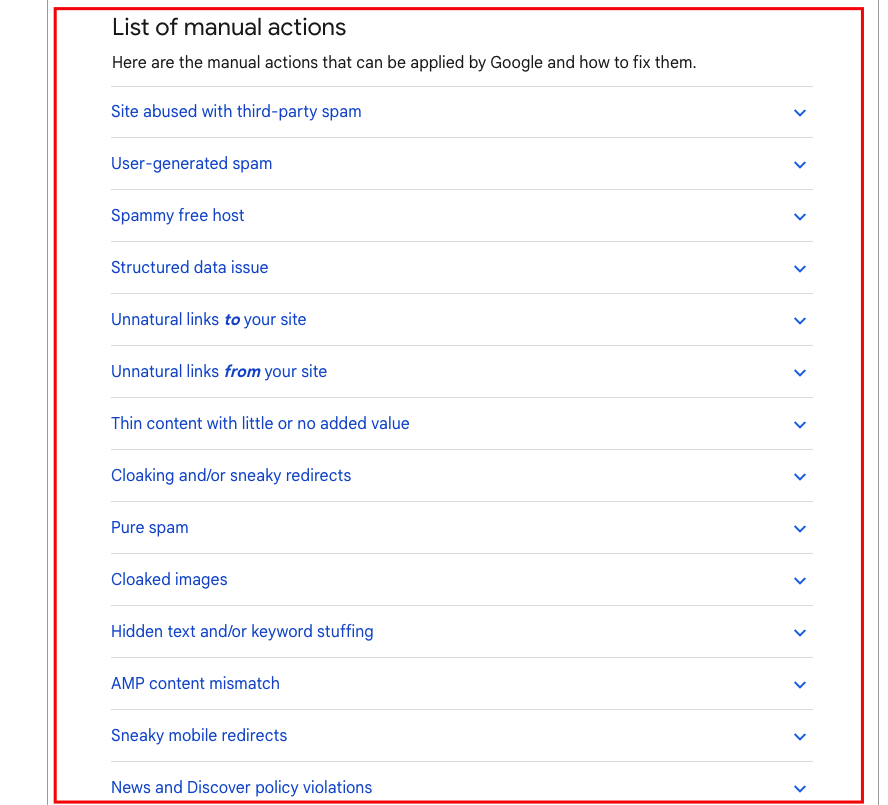
Keep in mind that the penalty message in GSC will usually give you a general idea of what the problem is. But it won’t point to specific pages or links on your site.
So, it’s up to you (or your SEO consultant) to conduct a thorough investigation of your website to find and fix the issue, and then submit the reconsideration request.
How to check if a site has been penalized algorithmically
Unlike manual actions, algorithmic penalties aren’t handed out by a human reviewer. These are automatic penalties applied by Google’s algorithms when they detect that a site is not complying with Google’s quality guidelines.
These are often tied to major Google algorithm updates, like the old and famous Panda (which targets low-quality content) or Penguin (which targets spammy or paid links).
How do you check if your site has been hit by an algorithmic penalty? It’s a bit trickier than checking for manual actions but with just a bit of experience, you will be able to assess whether your site has been penalized by a Gogle algorithm with a high level of probability.
Monitor Your Site’s Performance
Use a tool like Google Search Console or Google Analytics (organic traffic) to track your organic traffic and search rankings.
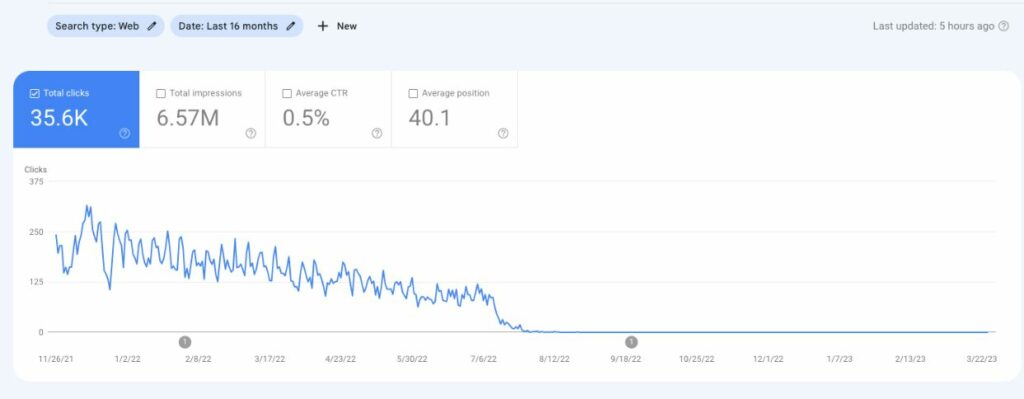
If you notice a sudden, significant drop that doesn’t correlate with any changes you’ve made (for example, if you deleted specific pages without redirecting them or performed an unsuccessful website migration), it could be due to an algorithmic penalty.
TIP: Don’t jump into conclusions too quickly and don’t take any action until you have fully analyzed the situation and you are certain what has actually caused the drop.
Match Traffic Drops with Google Algorithm Updates
Google regularly rolls out algorithm updates. Some are minor tweaks, but others can cause significant shifts in search rankings.
The best places to check if algorithm changes are happening include:
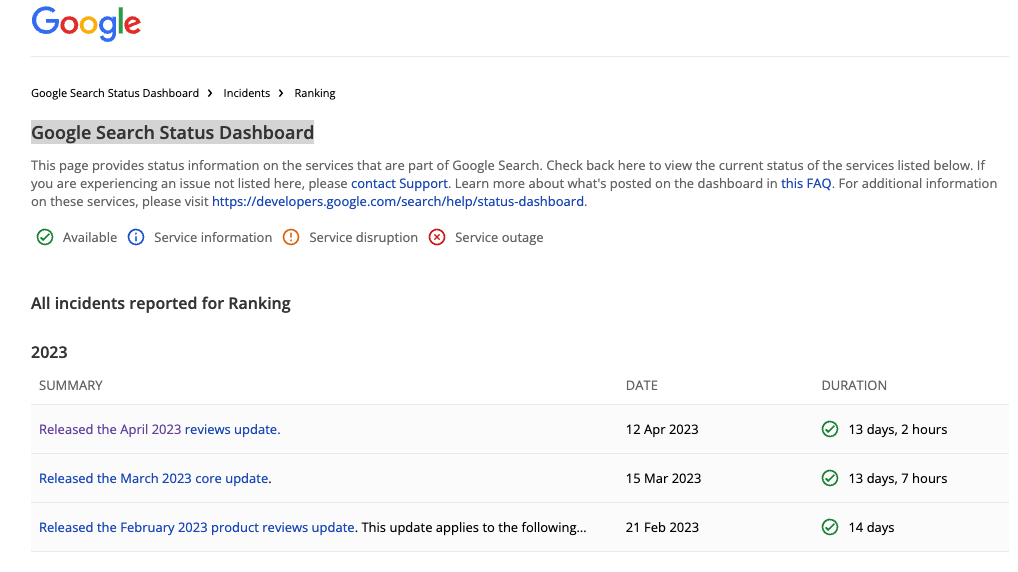
- Google Search Status Dashboard which maintains a record of these updates.
- Semrush Sensor that shows the SERP volatility
- Marie Haynes’ list of Google algo updates
- Search Engine Roundtable where Barry Schwartz reports on every little change in Google.
If you notice a drop in traffic or rankings around the same time as an update, it’s possible that your site was negatively affected.
Your task now is to learn about what the update involved (or what types of websites it “targeted” like a reviews update) and what other websites that are currently ranking above you do better than you.
Compare Google Organic Traffic with Bing Organic Traffic
This is probably the most reliable way to learn whether it is Google or your site to “blame” regarding the traffic drop.
All you need to do is compare the organic traffic trend in Google vs Bing. You can do that using Google Analytics or compare the data from GSC with the data from Bing Webmaster Tools.
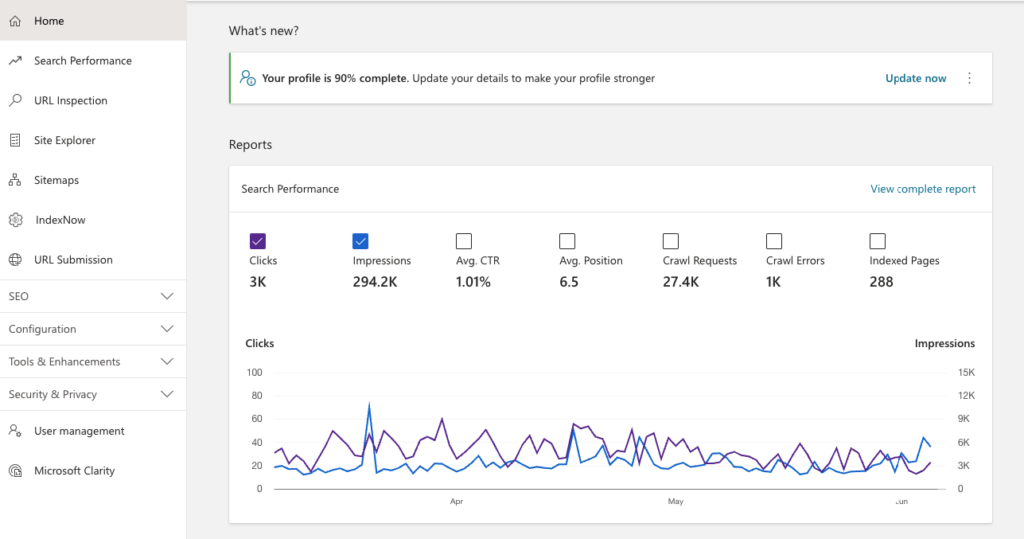
- If you notice a drop in your Google traffic but not in your Bing traffic, it might be a sign of a Google algorithmic penalty.
- If both Google and Bing traffic are dropping, you might be dealing with a technical issue with your website.
TIP: This method is reliable only if you have a decent and relatively stable amount of traffic from Bing.
Common Google Penalty Myths
In the ever-evolving world of SEO, there’s no shortage of myths and misconceptions, especially when it comes to Google penalties. Let’s clear up some of the most common ones:
There’s a Duplicate Content Penalty
Nope, not true. Google doesn’t impose a penalty for duplicate content. Instead, it tries to filter similar content and show the most relevant version in its search results.
While it’s best to avoid duplicating content as much as possible for user experience and ranking reasons, it’s not something that will lead to a penalty.
Check this: How To Find Duplicate Content
Google Core Algorithm Update is a Penalty
This is another common misconception. A core algorithm update isn’t a penalty; it’s more of a reassessment of the web pages in Google’s index. These updates aim to improve the relevance and quality of search results.
If your site’s rankings drop after an update, it’s not because you’ve been penalized. It’s likely that Google’s evaluation of your site in relation to other sites has changed.
More Backlinks, Higher the Risk of Penalty
Some people believe that having a lot of backlinks automatically increases the risk of a penalty. But the truth is, it’s not about the quantity, but the quality of backlinks. Having a large number of high-quality, relevant backlinks won’t get you penalized.
Look at some of the biggest websites in the world. They have millions of links and are doing OK.
What you need to do is make sure you don’t overdo with spammy or paid links like building hundreds or thousands of them on a very regular and consistent (pattern) basis.
Penalty Equals Permanent Ban
Another myth is that once your site is penalized, it will never recover. While penalties can significantly impact your visibility and traffic, they are not a life sentence.
With the correct actions and improvements, you can recover your website’s standing in search results. However, keep in mind that this is usually a very long process that requires a lot of work and patience.
If not a penalty, then what?
It’s time to take a step back and consider other possibilities that might be causing a traffic drop. Google penalties are not always the culprit; sometimes, the issue may lie within your site or the way it’s being monitored.
Here are some other possible reasons:
- Technical Issues: Your website might be experiencing technical problems that could be affecting your traffic. For instance, issues with page loading speed, broken links, or incorrectly-implemented redirects can lead to a poor user experience and lower rankings.
Check this: 15+ Technical SEO Issues (Examples)
- Server Issues: If your server is often down or frequently throws 500 errors, this can negatively affect your site’s availability and user experience, leading to a decrease in organic traffic. It’s important to keep your server in top shape and resolve any issues as quickly as possible. Check Google Crawl Stats report to get a basic overview of how Google is crawling your site and whether it’s having any issues.
Check: How Often Does Google Crawl A Site?
- Issues with Analytics Code: Your traffic may not have decreased at all; it could be an issue with your analytics tracking. If your Google Analytics code is broken, incorrectly installed, or missing from some pages, it can result in a reported drop in traffic. This issue often arises after website migrations, so it’s essential to thoroughly check your analytics setup after making significant changes to your site.
- Poorly Performed Site Migration: Speaking of migrations, if they are not done correctly, they can lead to significant traffic loss. For instance, if a migration coincides with a major Google algorithm update, it can be challenging to discern whether traffic changes are due to the migration or the update. To avoid this confusion, it’s important to plan migrations carefully and monitor your site closely in the aftermath.
Check this: 40-Step SEO Migration Checklist
In the complex world of SEO, it’s crucial to keep in mind that fluctuations in traffic can be due to a myriad of factors. It’s not always a Google penalty. Identifying the true cause requires a thorough examination of your site, your analytics, and your recent actions.
Is my site penalized by Google? FAQs
Let’s go through the frequently asked questions about Google penalties.
What is a Google penalty?
A Google penalty is a negative impact on a website’s search rankings due to updates to Google’s search algorithms or a manual review indicating that the website has violated Google’s guidelines.
How can I tell if my site has been penalized by Google?
Signs of a penalty can include a sudden drop in search rankings or organic traffic, or a penalty message in Google Search Console.
What’s the difference between manual actions and algorithmic penalties?
Manual actions occur when a human reviewer at Google determines that pages on your site aren’t compliant with Google’s webmaster quality guidelines. Algorithmic penalties, on the other hand, are automatic and occur when Google’s algorithms flag your site as violating these guidelines.
How can I understand the penalty messages in Google Search Console?
The messages provide specifics about the violation, the pages affected, and how to resolve the issue. Understanding them involves familiarizing yourself with Google’s guidelines and the terminology used in these messages.
What are some common Google penalty myths?
Some common myths include the idea that duplicate content leads to penalties and that Google Core Algorithm updates are penalties, neither of which are true.
If there isn’t a penalty, what else could cause a drop in traffic?
Several things could cause a drop in traffic, including technical issues with your website, server problems, issues with your analytics tracking, or a poorly performed site migration.
How can I recover from a Google penalty?
Recovery involves identifying the issue that led to the penalty, resolving it, and then submitting a reconsideration request to Google through Google Search Console.
Can my site be penalized for duplicate content?
No, Google does not impose penalties for duplicate content, but it may filter similar content in search results and only show the version it considers most relevant.
Are Google Core Algorithm Updates a form of penalty?
No, Google’s core algorithm updates are not penalties. They are routine updates Google makes to ensure it’s delivering the most relevant and high-quality results to users.
Can a Google penalty lead to a permanent ban?
No, penalties don’t necessarily lead to a permanent ban. If you take the right steps to fix the issues and comply with Google’s guidelines, you can recover from a penalty.
How long does it take to recover from a Google penalty?
The recovery time can vary depending on the severity of the penalty and how quickly and effectively you address the issues.
Can I prevent Google penalties?
Yes, by adhering to Google’s guidelines, regularly auditing your website for potential issues, and staying informed about algorithm updates, you can prevent most Google penalties.
In this case, you would need to perform a thorough site and analytics audit to identify possible issues. This could include checking for technical or server issues, ensuring your analytics tracking is correctly installed, or assessing the impact of recent changes like a site migration.
